All updates
22 Oct 2026Use bulk editing to quickly make the same change to multiple stops
Previously, making the same change to lots of stops could be repetitive or require spending time manually formatting stop data before uploading it into your app.
Now it’s quick and easy to apply the same change to multiple stops with bulk editing, making it even simpler to customize your route.
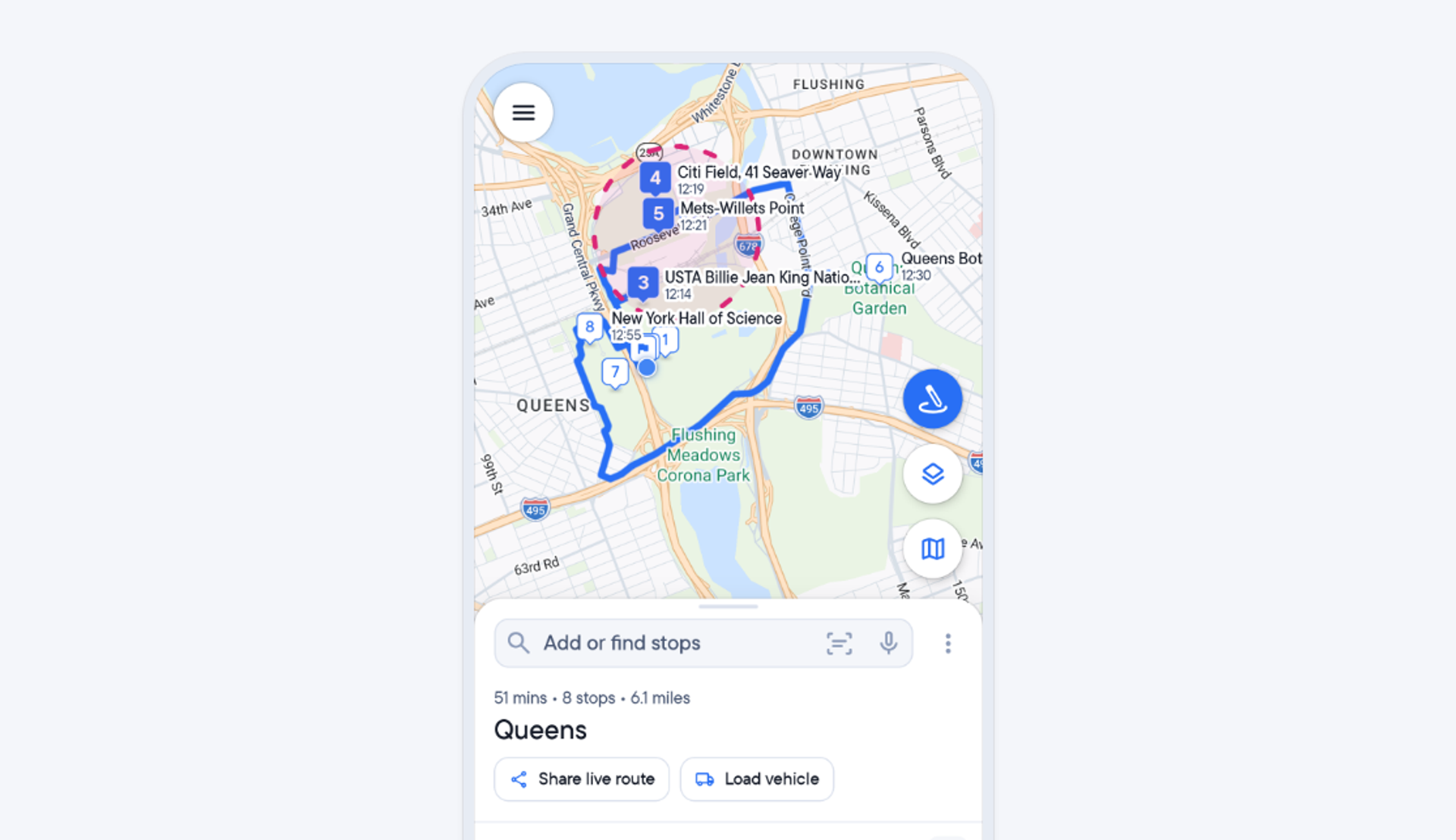
Once all your stops have been uploaded, you can now bulk edit stops by simply tapping the map or stops list to select stops or drawing around the stops you want to select. Once your selection is made, you can edit those stops and instantly apply the same change to all of them.
For example, the same ‘commercial’ stop type can instantly be applied to a group of stops at business premises, or a selection of stops on the outskirts of town could all be marked to be attempted at the end of the route.
Whilst driving your route, you can also use bulk editing to select and mark a group of stops to be attempted next on your journey.
This feature is currently available on Android and will be coming soon to iOS.
- Add your stops, tap > the pencil icon
- Select the stops you want to bulk edit by drawing around them, long press on them in the stops list, or tap them on the map
- With all the stops selected, tap > Edit
- Make your change eg apply a stop type, change the order etc then tap > Done
- You can bulk edit stops before and after a route has started
