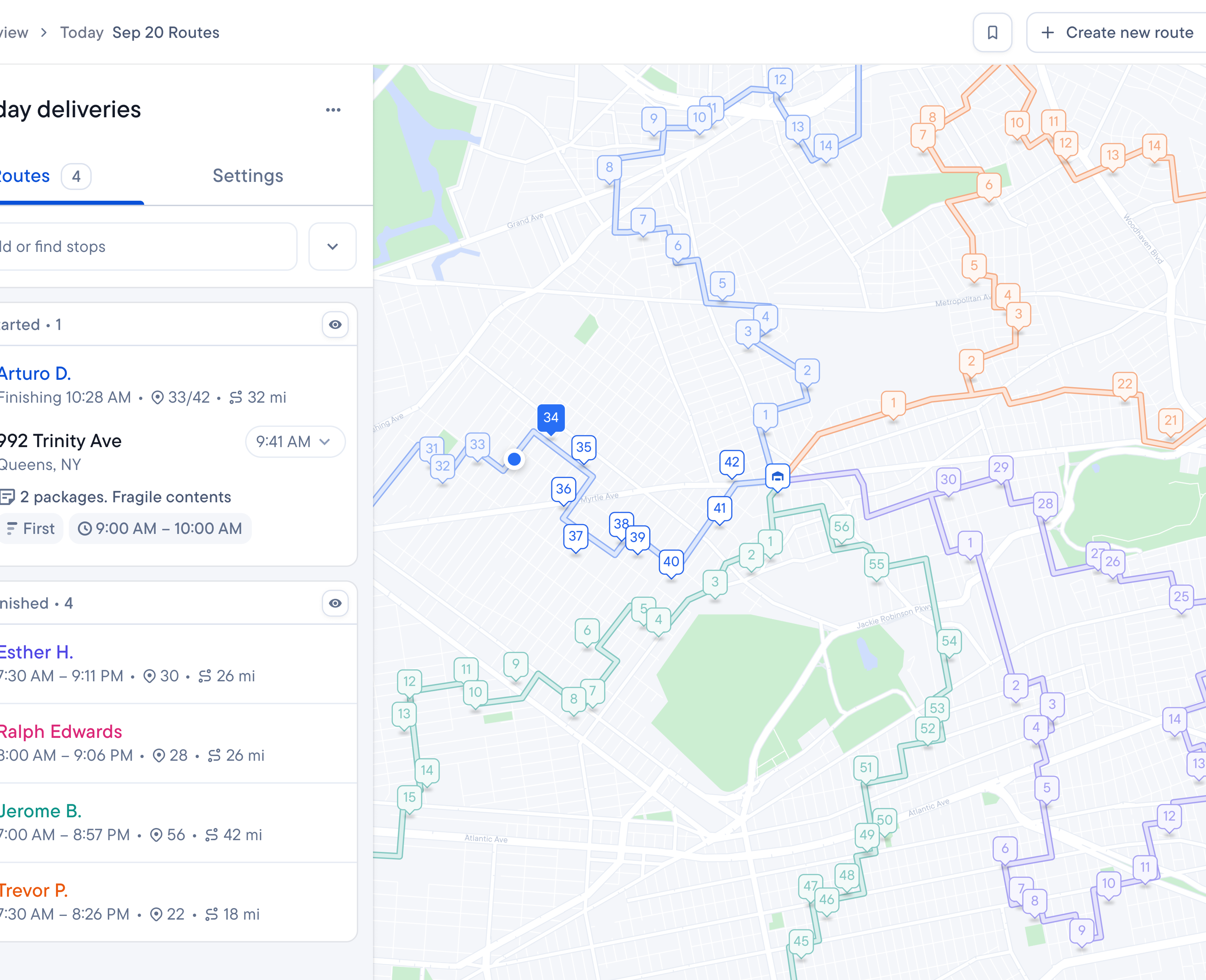
Last mile delivery tracking means keeping watch on a parcel’s final leg from the depot to the customer’s door. Simple enough on paper. But if you’re running a courier operation, you know it’s never that simple.
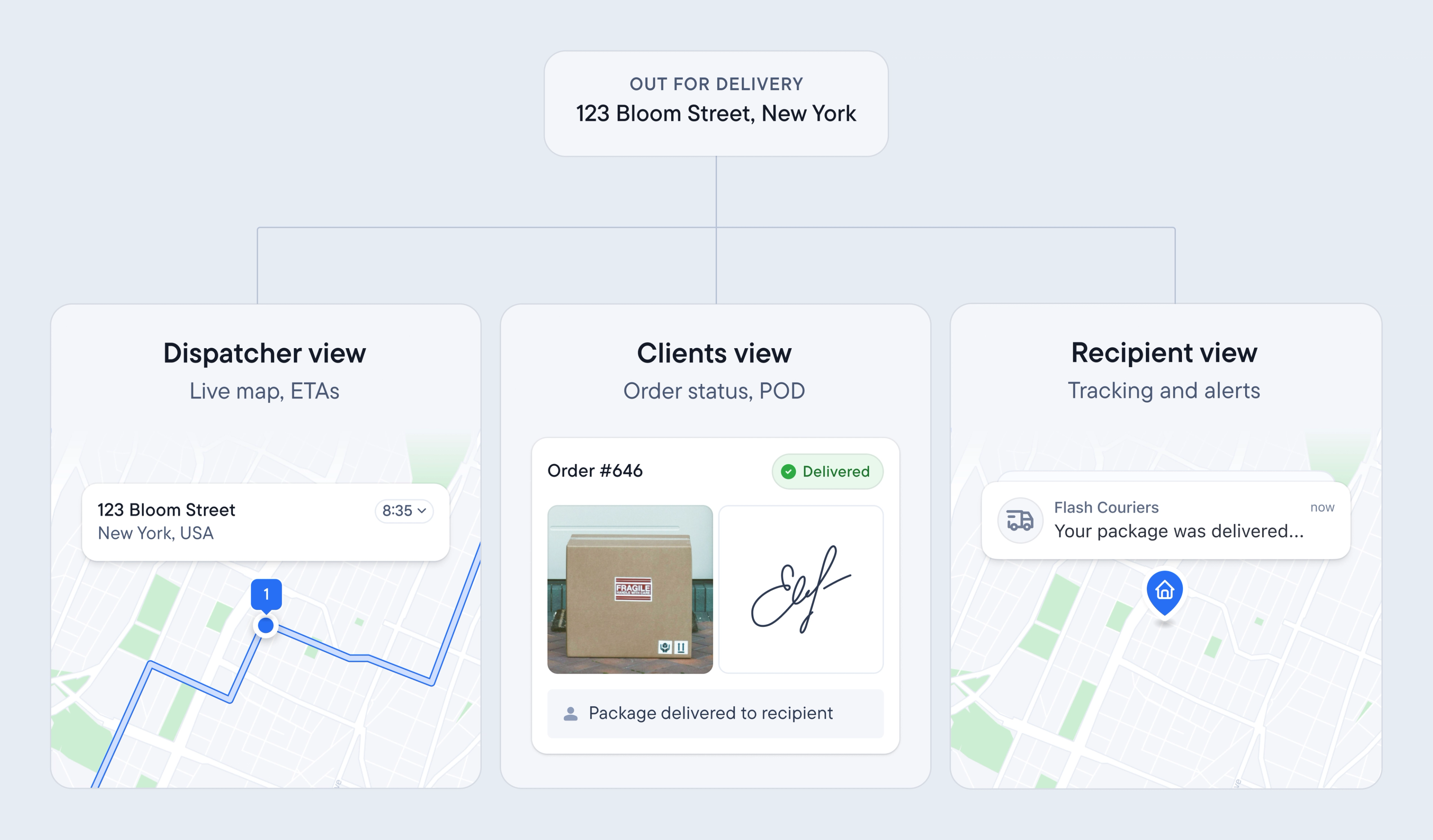
For most businesses with in-house delivery teams, this is a two-way street: the business tracks the delivery and the customer waits for it. As a courier company, you’ve got three layers (or three parties) to keep happy all at once.
Your dispatch desk needs to see where every driver is, your shipper clients need to see the status of their orders, and the recipient just wants to know when to expect a knock at the door. If something goes wrong for any of these parties, you’re the one left to deal with the fallout.
Here, we’ll break down what live tracking looks like for each layer of the last mile delivery process, and how it brings the three together.
Why last mile delivery tracking matters
Without it, you’re stuck in the dark the second a driver leaves the depot.
When you do have decent tracking, it’s much easier to cater to the wants and needs of all three parties and keep them in the loop at all times.
Layer | Who’s it for | What it looks like | The benefit |
|---|---|---|---|
Dispatcher | You and your driver team | A live map of every driver | You can catch problems before they happen |
Shipper clients | The businesses you deliver for | Their own view of their own orders, plus proof of delivery | They stop calling you, you stop being their human tracking system |
Recipients | The person receiving the parcel | A text with a delivery window, a tracking page, and proof it arrived | They know exactly when to expect their order |
These three layers make up individual parts of the same journey and they’re all connected. For example, shipper clients use the same timestamped, geotagged proof of a completed dispatcher stop to let customers know when they can expect their order.
The key to good last mile management is understanding that all three are cogs in a bigger machine… and then bringing them together into one system.
What last mile delivery tracking looks like for dispatchers
Days don’t always go to plan for dispatchers. A driver might hit traffic, a gate code might not work, the recipient might not be home, you know the drill. Right now, you probably find out about all this from the driver via irksome phone calls. Or from the client when they’re checking in on the status of an order.
With last mile delivery tracking, dispatchers get a live map showing exactly where each driver is on their route. This comes with a real ETA based on the stops they still need to do. If there’s a problem, you’ll know about it straight away and can rectify the issue with no back and forth.
A delivery driver tracking app shows you exactly where your fleet is right now. Tracking your deliveries as a whole gives you more context, like whether stop #14 will still make its noon deadline. If you’re juggling five clients and 500 stops, it helps to have a birds-eye-view of what’s going on at all times.
What last mile delivery tracking looks like for your shipper clients
Every shipper client you work with has their own bank of customers constantly asking where their order is. If they can’t answer without calling you, you automatically become the go-between (and, by extension, the bottleneck).
RoadRunner, a driver recruitment and fleet management company, shared what this looked like for them:
Lots of clients are still very old school in terms of their tech systems. No ETAs, no ability to track the drivers. POD that they can’t access for hours or even until the next day! It’s just old and clunky, so by using Spoke Dispatch, we definitely have the advantage.
A lot of couriers are still stuck in the before-state and it’s causing problems. In a 2025 study by Descartes that covered 8,000 consumers across Europe and North America, 79% said they’d had a delivery problem in the last three months. Your shipper clients feel that pressure from their own customers every day.
There’s another popular stat doing the rounds from Gorgias’ helpdesk platform data: WISMO requests make up around 18% of ecommerce support contacts. That’s still a lot of calls a shipper client would rather not take, and a lot they’d rather not make to you either.
Last mile visibility is crucial here, and couriers can with good last mile management tools can offer their shippers:
- A portal where each shipper client can log in and see their own live orders that get updated as and when the driver moves.
- Proactive alerts when a stop is at risk.
- Proof of delivery shippers can pull up themselves when they get a WISMO inquiry.
PedL, an ebike and scooter retailer and client of Sydney courier IncaPost, described what a difference it makes having a trusted delivery management software on-side:
Spoke Connect has pretty much everything I need to know about an order. It’s very rare now that I need to contact IncaPost about an order.
It’s important for last mile couriers to minimise the amount of “he said, she said” situations.
The recipient says their parcel never arrived, your driver says they left it on the porch. Without a record of it, you won’t know what happened.
Proof of delivery and barcode scanned proof of custody gives you a timestamp, a geotag, and a photo or signature, captured right when the parcel was delivered. This is excellent evidence to have up your sleeve and protects you against chargebacks.
What last mile delivery tracking looks like for the recipient
While the above logistics go on behind the scenes, you have your end recipient waiting to get their hands on their parcel. This is the part of the last mile leg that they see. It’s a critical stage because it directly impacts customer satisfaction and loyalty.
For the recipient last mile delivery tracking looks like:
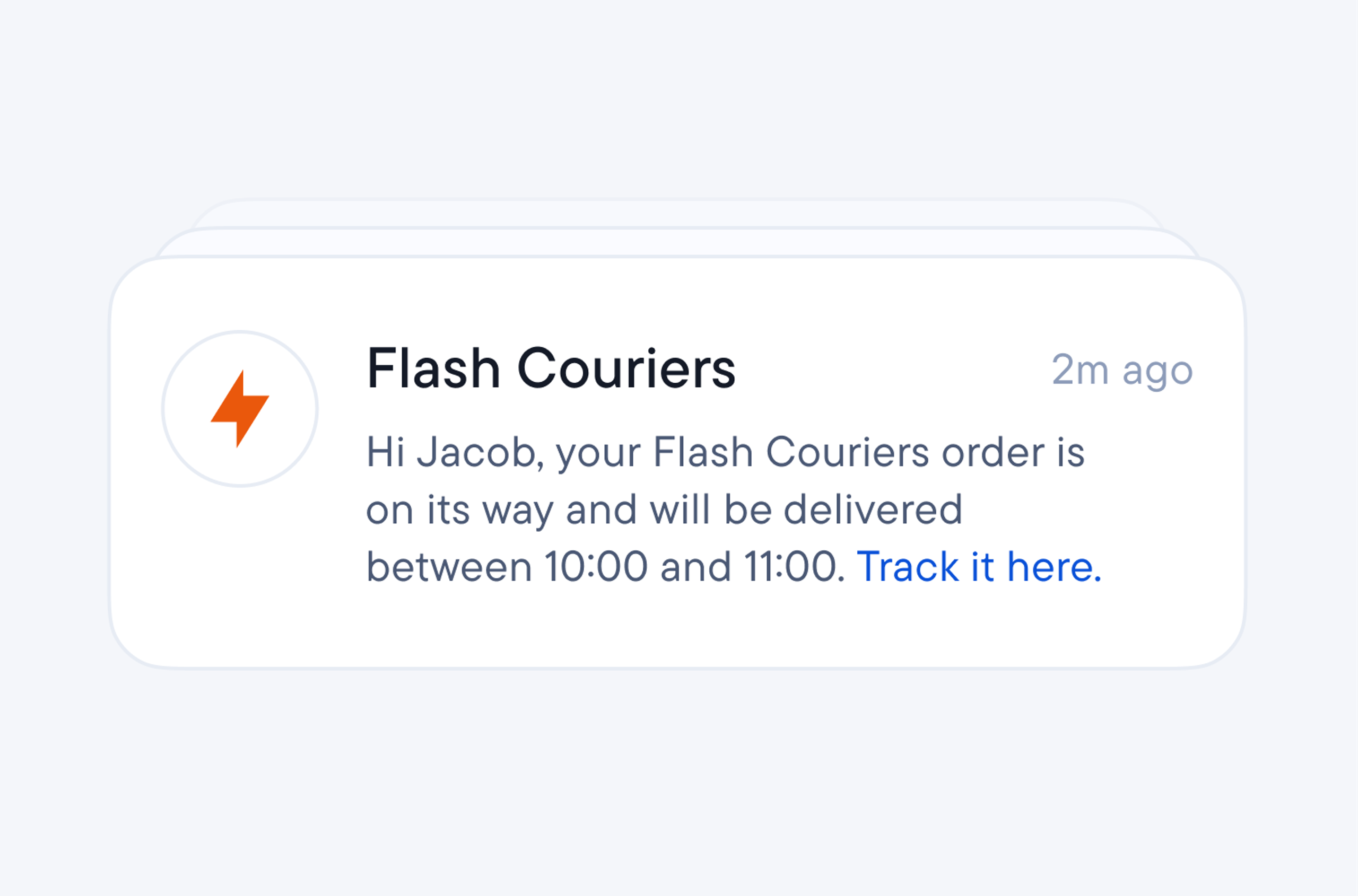
- SMS and email notifications with a live ETA that updates as the driver gets closer.
- A recipient tracking page showing their position in the queue and, near arrival, the driver’s location.
- Branded tracking pages and a custom SMS sender name so they know who’s messaging them.
- Delivery notifications (with restricted windows so they don’t get woken by a 6am text).
- A place to add delivery instructions for the driver.
- Clear confirmation once the parcel’s dropped off.
Basically, live tracking keeps them in the loop so they’re not waiting around all day for their parcel. The end result is a happy customer and a marked reduction in failed deliveries.
A GPS pin isn’t the same as proper tracking
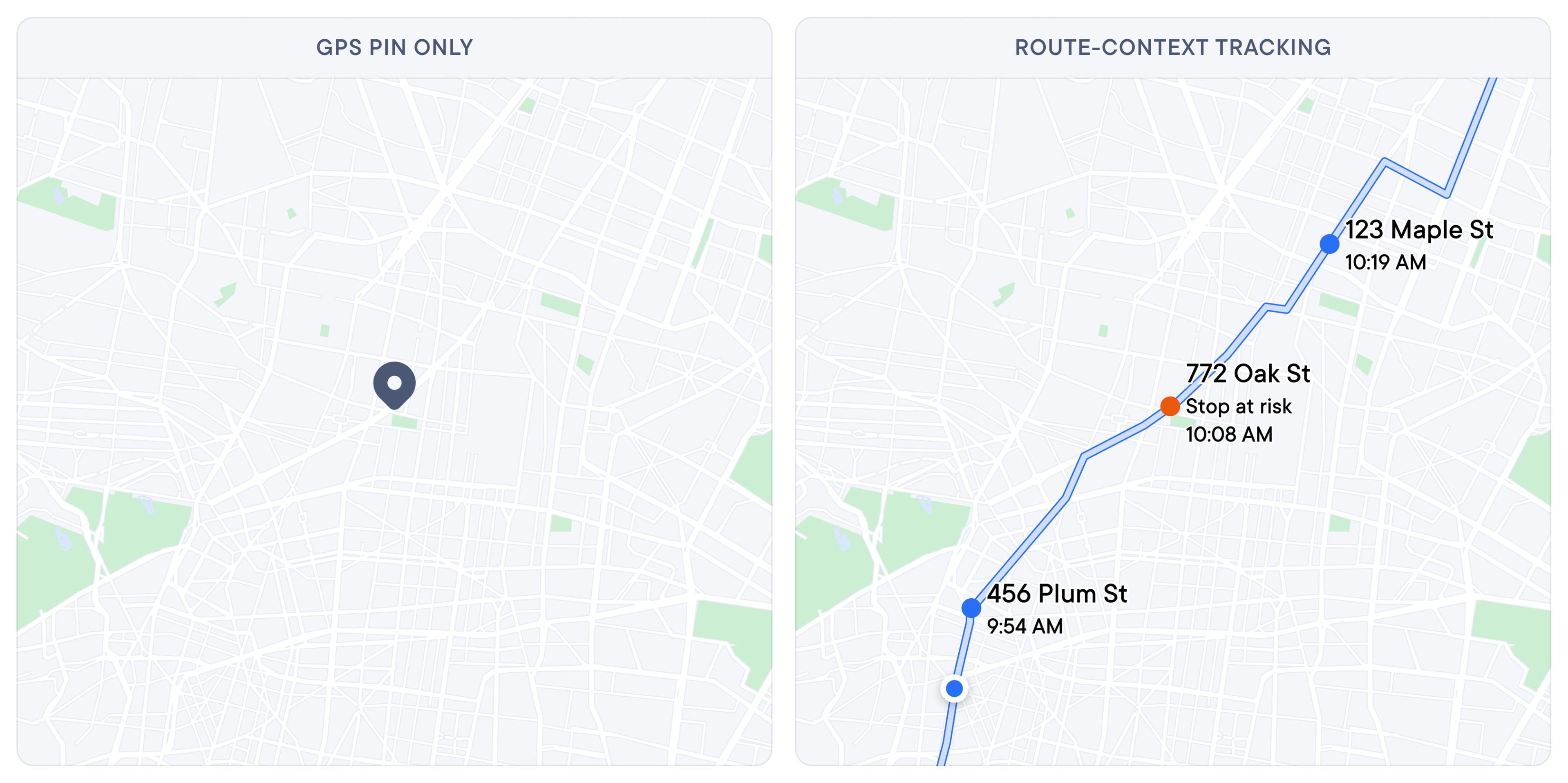
A GPS pin can tell you a van is sitting at Main and Fifth, which is great, but it’s also pretty useless on its own. It doesn’t tell you whether that van is on schedule or which stop it’s headed to next.
This is why pins without route context are pointless. When you know where a driver is and what that means for your wider operation, you can decipher whether they’re going to miss a delivery window and automatically update the recipient straight away. Not doing this can cost you money.
Loqate’s “Fixing Failed Deliveries” study put the domestic first-time failure rate at around 8%, at an average cost of $17.20 per failed delivery. Catching an at-risk stop early, whether that means a route adjustment or an early heads-up to the client, is a lot cheaper than a failed delivery and a redo.
Spoke Dispatch’s route monitoring is more advanced than a simple GPS tracker because it tells you where your drivers are within the context of the route you made. From the dashboard, you can make changes as needed (such as bulk adding stops or removing stops) and can provide any updates to customers who call in asking for information.
How Spoke Dispatch covers all three layers
You don’t need three separate tools to cover the three layers of tracking. Spoke Dispatch is built to handle all of it from one place.
Your dispatch desk gets the live map of every route with per-stop ETAs, color-coded by driver, with at-risk warnings that flag any stop in danger of missing its window.
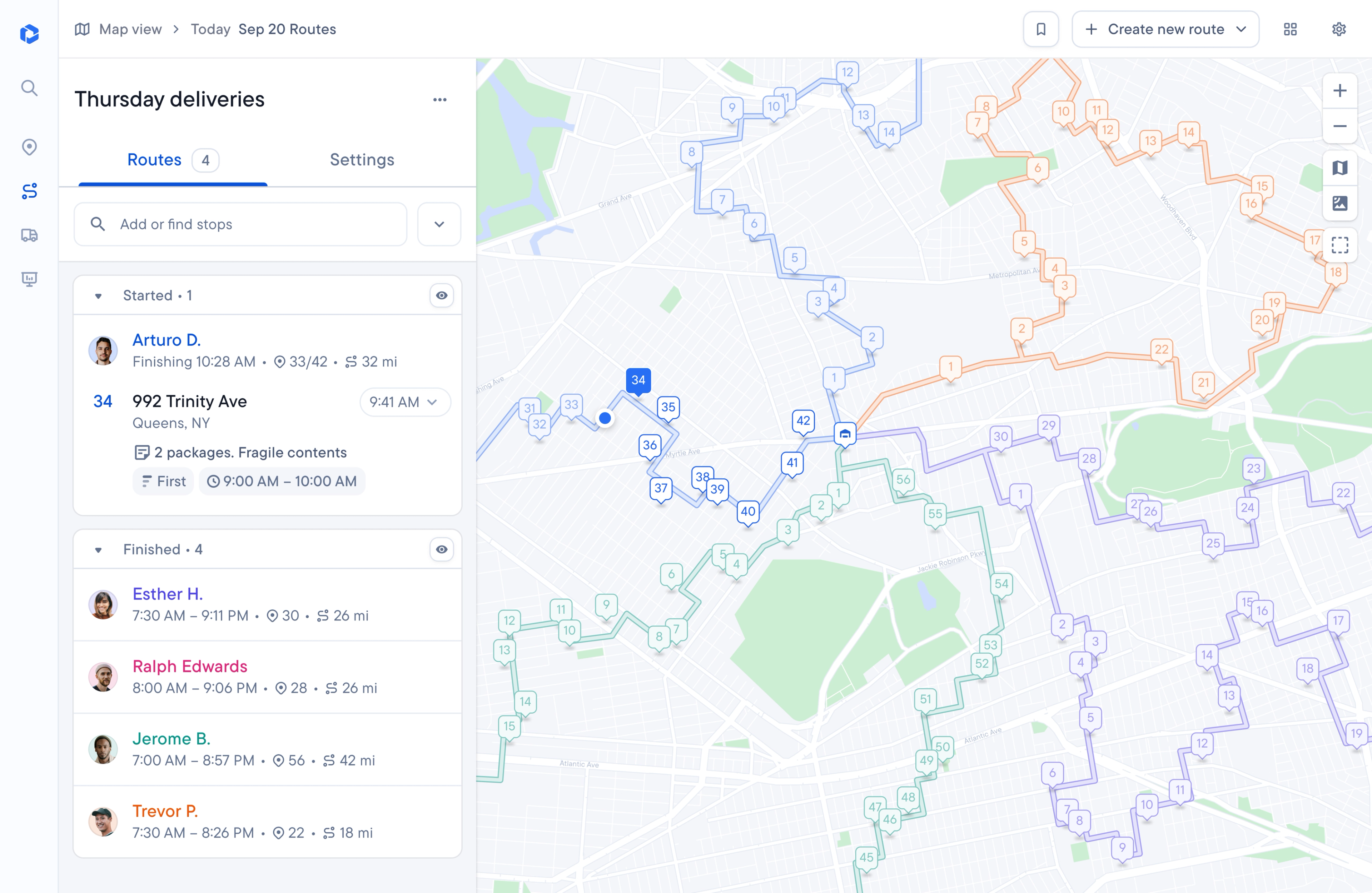
When something does go wrong, you can edit a route that’s already in progress (add stops, remove them, reorder them) and the driver is notified of the change automatically. Every stop also gets a tracking link the moment it’s created before the driver even starts. Recipients get theirs automatically by SMS or email, and clients see the live status in their portal. And when a client calls about a specific order, a quick search by order number, address, or recipient name pulls it up in seconds.
Your shipper clients get their own view with their own orders when they log into Spoke Connect.
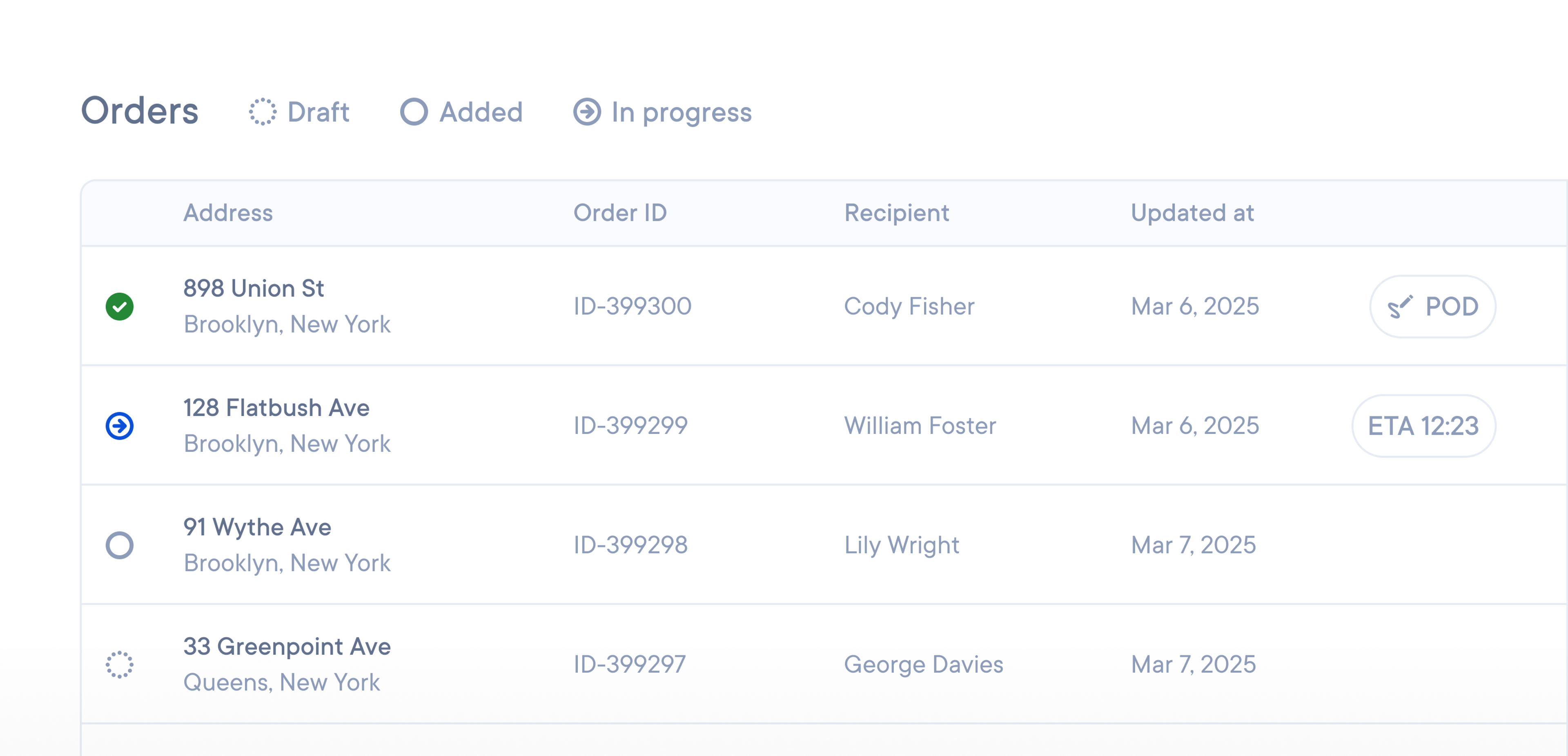
You can set different proof of delivery requirements per client (one might want a photo and a signature, another is happy with a safe-place photo), choose mandatory PoD on certain stops, and set time windows to keep deliveries inside each client’s SLAs. When a query comes in, clients pull up a stop’s full record themselves, or you share it in one click. Late and failed stop reports give you a ready-made record of on-time performance if a dispute ever needs settling.
Your recipients get the notifications and branded tracking pages covered above, but there’s one more trick worth knowing: you can put your client’s customer service details on the recipient tracking page, so delivery queries go straight to the shipper instead of your dispatcher’s phone. Near arrival, recipients can also text the driver directly with things like gate codes.
What happens when everyone’s in the loop
Last mile delivery tracking makes sure your dispatch desk, your shipper clients, and the person waiting at home for their parcel are all seeing the same information, at the same time.
When you can bring the journey across three layers together in one place, you’ll find you spend a lot less time on the phone putting out metaphorical fires. And, if a delivery is ever disputed, you have everything you need to sort it out quickly.
FAQ: last mile tracking, answered
Note for dispatchers: These are the questions recipients type into Google every day. Worth knowing what your clients’ customers are being told.
What is a last mile tracking number?
A last mile (or “final mile”) tracking number is the unique ID assigned to a parcel for the final leg of its journey, from the local hub or depot to your door. It’s often different from any earlier long-haul tracking number, because the last stretch is often handled by a different, local carrier. You enter it on that carrier’s tracking page to see status updates like “out for delivery” and “delivered.”
What is a last mile carrier?
A last mile carrier is the company that handles the final leg of delivery, moving a parcel from a local distribution point to the delivery address. It might be a national carrier, but could also be a regional or local courier that the retailer or a larger carrier subcontracts the parcel to for the final stretch. It’s the carrier whose driver actually brings the package to your door.
How do I track a last mile delivery?
Find your tracking number in your order or shipping confirmation email (or your account with the retailer), identify which carrier is handling the final leg (the confirmation usually tells you), and enter the number on the carrier’s tracking page or app. If the retailer offers its own branded tracking page, that page will usually show the same status and, on the delivery day, might show you the delivery window or live map.
Why does my tracking say “delivered” but nothing arrived?
“Delivered” means the carrier’s system recorded a delivery event, sometimes with a photo or GPS location. Check the delivery photo and location if available, look around the property and with neighbors, wait a few hours, then contact the retailer or carrier. A complete proof of delivery (photo, geotag, time) will help them investigate quickly.
Is a last mile carrier the same as the retailer I bought from?
No. The retailer sells the item and the last mile carrier delivers it. Retailers frequently outsource the final leg to specialist courier companies, which is why your tracking can switch to a carrier name you might not recognize.