Running a courier operation means constantly managing multiple problems: drivers who need direction, clients with different expectations, and exceptions that show up without warning.
Without a clear process, dispatch is constantly putting out small fires, like chasing down proof, fielding client calls, and re-explaining things to every new driver, rather than managing larger operations as a whole.
Effective courier management keeps the day-to-day operational tasks all under control. And while software can support the work, having a solid courier management process comes first.
What courier management covers
Courier management is the day-to-day work of running a courier company. It includes: hiring and scheduling drivers, managing zones, meeting client SLAs and expectations, handling exceptions, running and closing out each day, and tracking performance.
Hiring and keeping courier drivers
Hiring and keeping quality drivers helps keep customers satisfied. Even if a route is well-planned, it needs an efficient driver to execute it. Courier management creates a structure that every driver understands from day one, so they can manage their stops, time, and priorities with confidence, without relying on constant instructions from dispatch.
That structure comes down to three things:
- Hiring criteria: A standard set of requirements for drivers helps you filter through applicants to find qualified employees more quickly (e.g., they must have a valid driver’s license and a clean driving record).
- Onboarding materials: Ensure drivers receive and read through onboarding materials before they start. Drivers’ onboarding materials should include app/technology walkthrough, route and territory info, client-specific notes, and a handbook or quick-reference guide. That way, dispatch isn’t walking them through every detail live.
- Clear expectations: Address drivers’ potential questions early on so they don’t fill in the gaps on their own, which leads to every driver doing things differently and can reduce quality. Set expectations about schedule and punctuality, proof of delivery requirements, performance standards, reporting issues or problems, and code of conduct.
Scheduling drivers to match delivery volume
Too few drivers lead to missed or delayed deliveries, while too many waste available labor. Effective driver scheduling helps companies build out shifts based on actual volume, keep back-ups for no-shows or call-outs, and assign routes accordingly.
When creating a schedule, consider:
- Shifts that meet demand: Create a shift structure that reflects demand patterns. If most deliveries need to be made before noon, schedule more drivers in the morning.
- Schedule backups: Have drivers who can be on-call or per diem, so when someone calls out or doesn’t show up for their shift, you can still meet customer demands.
- Track driver availability: Keep track of vacations, days off, and other changes in availability in a shared calendar so the schedule is built around them from the start and not discovered the day of.
- Assigning drivers: Keep the same driver on the same route as often as possible to avoid delivery delays. For example, a driver who regularly drives the route knows which buildings have loading dock restrictions.
- Workload balance: Balance routes by accounting for drive time, time at each stop, and route difficulty, so no driver is always overloaded while another always finishes early.
Zones and service areas
Delivery zones and service areas are numbered, mapped-out sections of a courier company’s service territory. Companies create these zones to make it easier for dispatchers to assign drivers to specific coverage areas.
With zones, drivers know their territory and dispatchers don’t have to rebuild routes every day from scratch. A driver who runs the same neighborhood every day learns the fastest paths, the buildings with tricky access, and client preferences.
Zones break down when a specific area has a lapse in coverage. A driver calls out sick, and their zone goes uncovered. Or a client suddenly requests a priority pickup, but that zone’s assigned driver is already done for the day.
For the best results, build zones that hold up by default but have room to adjust when the day doesn’t go as planned. Cross-train drivers to know at least two zones so there’s always coverage.
SLAs, proof, and client expectations
Successful courier management depends on how well your team can meet each customer’s service requirements, including service level agreements (SLAs), proof of delivery methods, and client expectations.
How SLAs affect daily operations
SLAs are contracts between the courier and the customer that define standards and expectations. Every pickup and delivery has agreed-upon commitments that dispatchers and drivers need to understand before the work begins.
- Time windows: Clients have specific delivery windows, based on their hours of operation. Say a bank client is open from 8 a.m. to 5 p.m., and a restaurant is open from 4 to 11 p.m. These two businesses are going to have much different time windows.
- Service scope: The SLA establishes the general service to be provided to the customer. Does the customer anticipate pickups and deliveries included? Does this customer need frequent same-day or on-demand deliveries and pickups?
- Client-specific handling rules: These instructions tell drivers and dispatchers how to complete a delivery. Maybe the customer requires curbside deliveries, or delivery to a certain department.
- Reporting requirements: Customers expect regular updates or records to show service is being performed. That might be in the form of daily delivery summaries, weekly or monthly performance reports, or a report based on established KPIs.
- Escalation requirements: If commitments aren’t met, there are agreements in place on how to rectify the situation. Escalation requirements define who needs to be notified, when, and what actions should follow.
Proof of delivery (POD) methods
Capturing proof of delivery protects your business and gives clients assurance that a delivery was completed according to the SLA. Capture a full range of POD methods and sync them instantly to your dispatcher dashboard so you can resolve disputes or answer client questions without waiting for the driver to check in.
- Photo capture: Your driver takes a photo of where they left the package and typically uploads it to an app. The customer gets a notification that their delivery was completed, and a copy of the photo is sent directly to them so they know where their item is located.
- Signature capture: If you’re delivering something with age restrictions, is pricier, or is otherwise sensitive, customers may ask for a signature. Using an app, you can turn your driver’s smartphone into a trackpad, where the customer can sign for the package with their finger.
- Barcode scanning: Every package has a barcode that the driver scans at each handoff stage. It keeps everyone in the chain of custody accountable and creates a source of truth that shows exactly where a package is located.
- Timestamps: This records the exact date and time a package was picked up or dropped off. In addition to being a source of truth, if anything goes wrong, it also confirms to the customer that drivers are (or are not) adhering to time windows.
- Custom proof requirements by client: In addition to standard methods, some clients will also ask for other proof. For example, some customers may require that drivers log a note at delivery or pickup that says, “Delivered/Picked Up by [Driver Name].”
Managing different client expectations
Every client has different expectations for their deliveries. Document those preferences up front so drivers and dispatch know what each client wants.
- White glove deliveries: Clients may request white glove service for high-value, fragile, or bulky items that need extra care. With this service, drivers are often tasked with assembly, installation, or lifting to higher floors.
- Communication preferences: Clients can choose how they prefer to communicate with your company. Document whether they want real-time notifications and how those notifications are delivered. For example, they may request phone calls for any exceptions, but texts for regular updates.
- Redelivery and remedy expectations: Document exactly what the client expects to happen after a driver misses a stop. Expectations could include same-day redelivery, next available window, or client pickup.
Exceptions during the day
When you’re managing a team of couriers, the reality is the route will change as the day goes on. Perhaps there’s unexpected traffic that’s led to a congested highway. Or maybe a customer calls in and cancels their order or needs to receive their order later in the day. An important part of mastering courier management is adapting to these challenges without sacrificing the savings you were making by creating a highly optimized route.
Bad addresses
If a driver arrives at the wrong address, they should contact the customer or recipient to verify the address. If the correct location is nearby, dispatch may reroute the driver. If the address can’t be confirmed before the route continues, the stop should be documented, marked as an exception, and rescheduled according to the client’s SLA.
Late drivers
Drivers may run late due to personal reasons or reasons outside of their control, like an accident or unexpected traffic. As soon as a driver knows they’ll be late, they should contact the client or dispatch. If the driver, or a backup driver, cannot deliver or pick up within the customer’s designated time window, dispatch will reschedule the delivery with the customer.
Failed attempts
If a driver can’t complete a delivery, they should document the reason for the failed attempt, capture any required proof, and notify dispatch. Dispatch can then determine whether to reschedule the stop, contact the client, or follow the procedures outlined in the customer’s SLA.
Priority changes
Delivery priorities may change throughout the day as urgent requests, delays, or customer needs arise. Once dispatch receives the priority change request from the customer, they should notify affected drivers of the changes as soon as possible.
Resolving missing or incomplete proof
If a driver forgets to capture the required proof of delivery, they should notify dispatch, who can determine whether a courier needs to follow up, according to the client’s requirements. If, for some reason, they can’t capture proof, they should contact dispatch before leaving the stop location. Dispatch can determine whether an alternative form of proof is acceptable.
Running and closing the day
Making sure the day is wrapped up with as few loose ends as possible is almost as important as a successful daytime operation. End-to-end courier management includes getting drivers loaded and on the road, catching problems in real time, and confirming every stop is proven and accounted for by end of day.
- Route build: Drivers load the van in route order so it’s easy to find the right package. A route that’s built and loaded well gets drivers on the road faster and keeps them moving efficiently.
- Live monitoring: Monitoring each driver’s completed stops, next stops, and pace (in real-time) against their schedule lets dispatch catch problems early before a client has to call and ask.
- Client updates: Keep clients informed on delays or status changes. Customers don’t want to have to guess when their package is arriving. For example, if you’re delivering to a business, then they might be waiting on their delivery so they can fulfill their own orders.
- End-of-day proof checks: Dispatchers run an audit to confirm that proof was captured for every completed stop so they can catch something the same day, rather than days or a week later.
- Unresolved stops: At the end of each day, dispatch will also check on the jobs that are still open (e.g., due to a bad address or failed delivery) and reschedule or make another plan to resolve them.
Performance metrics
Delivery metrics can be tracked and compared over time, so you can catch problems early, fix what’s not working, and show clients proof of your performance. Here are ones to consider:
- On-time delivery: The percentage of stops completed within the client’s agreed time window.
- First-attempt success: The percentage of deliveries completed on the first try.
- Failed delivery rate: The percentage of stops that couldn’t be completed.
- Average time per stop: How long drivers typically spend at each stop.
- Driver performance: How each driver performs with regard to speed, accuracy, and completion rate.
- Route completion: The percentage of a planned route actually finished by the end of the day.
- Client-level issues: The number of complaints or exceptions submitted by each client.
- Cost per delivery: The average cost to complete a single delivery, factoring in labor, fuel, and time.
Where courier management software fits
All the things that courier management covers can be done manually. But courier management software makes it faster and easier to manage as your operation grows.
Driver app
Drivers can use a mobile app to navigate their route and calculate the next stops and the route to take. Dispatchers can change the route from their dashboard, and the changes will show up on the driver’s mobile app. Or drivers can make a change to the route and swap stops if something comes up that gets in the way of their next delivery.
Proof of delivery
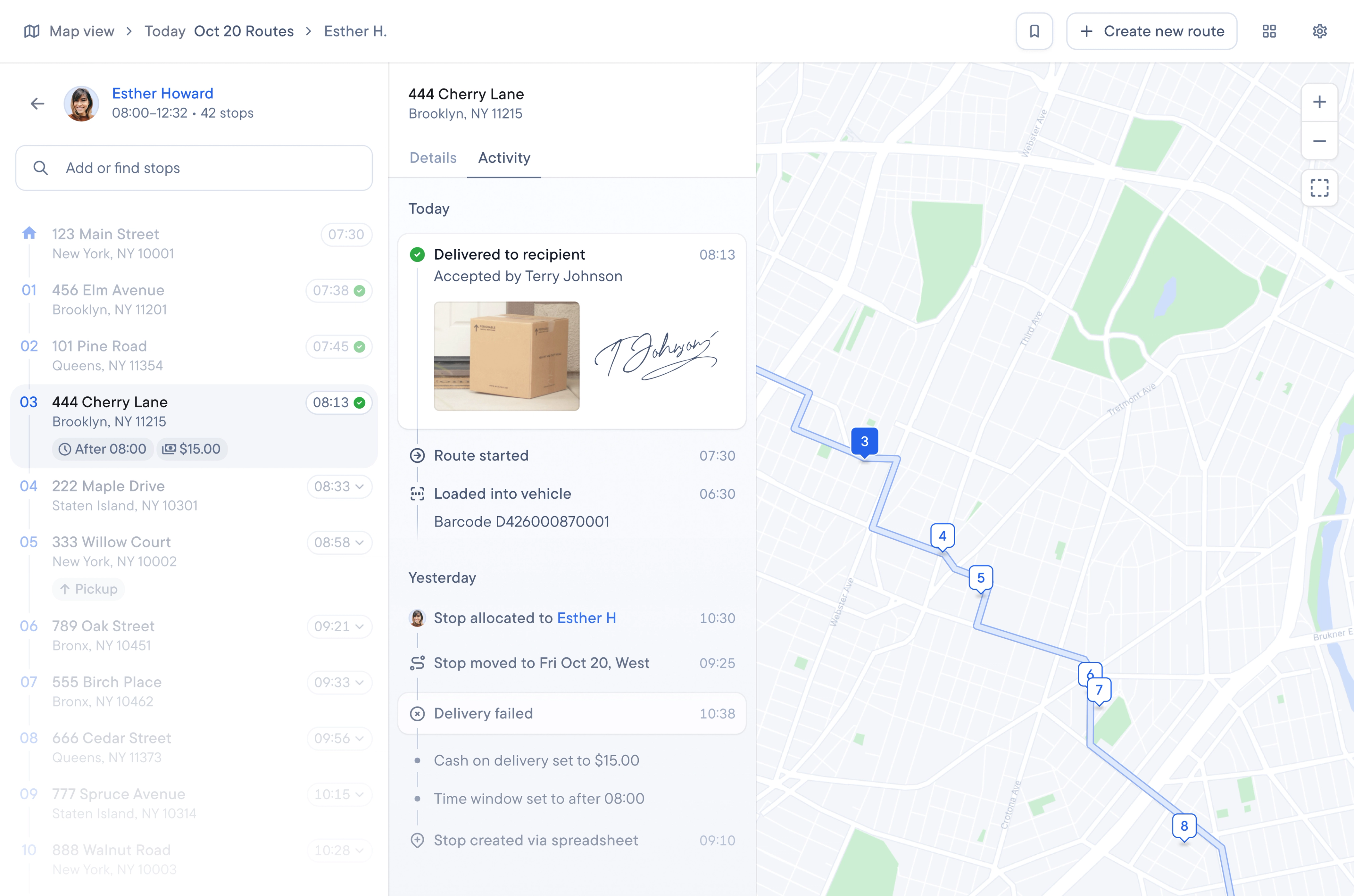
Software allows you to collect proof of delivery (POD); POD methods are captured within the driver app and synced with the dispatcher dashboard and client portal.
API and integrations
Using API and integrations, courier management software connects directly to the tools you already use, including order platforms, e-commerce systems, and more, so information is automatically synced between the platforms. No one has to manually re-enter information from one system to another.
Delivery analytics
Courier management software helps dispatchers track the metrics that matter most to clients and to the business, and most platforms let you export that data across routes and drivers for regular review. It allows dispatchers to catch recurring problems or answer client questions with concrete numbers. For example, if one driver is consistently making late deliveries, exportable, clear data makes it easy to spot that pattern and address it.
Route planning and optimization
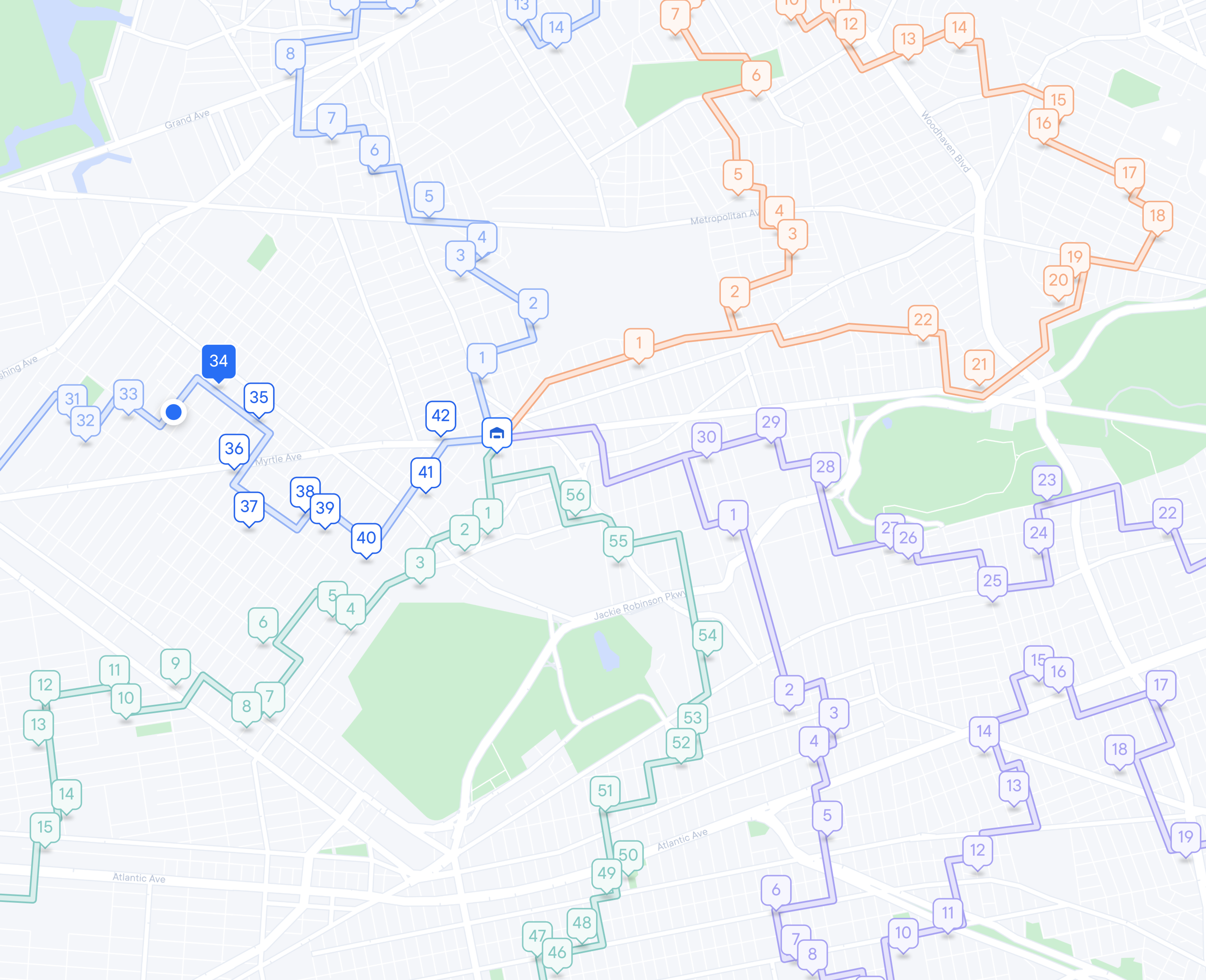
Courier management software allows you to easily optimize routes. It factors in time, distance, speed, traffic patterns, and several other critical factors. You can optimize routes for just one driver, or for several drivers at the same time. It enables drivers to run their routes more efficiently, so they have time for more stops in a day. They spend less time in transit and more time making stops.
Live tracking and client updates
When you use courier management software, you can automate delivery updates. When your courier starts their route, customers get an SMS message or an email telling them the ETA of their package based on the optimized route. The message also includes a link that they can click to watch a dashboard, updated in real-time, of where their courier is and their updated ETA.
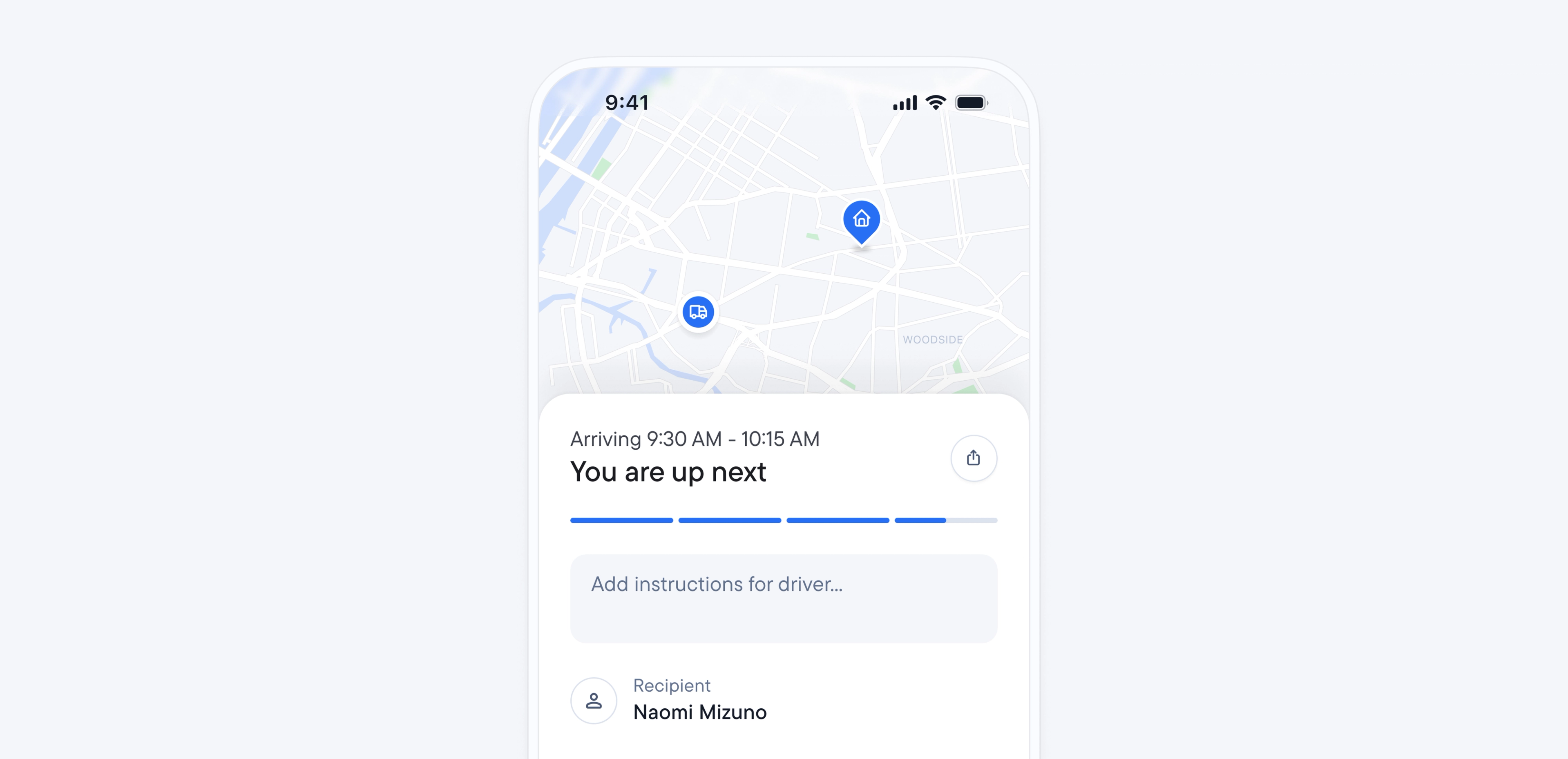
And as your courier gets close to completing their stop, the customer gets another message, telling them how far away their package is.
Why you should use Spoke for courier management
Spoke Dispatch lets you:
- Optimize routes for speed (while customizing them for your customer base).
- Monitor routes in progress (and easily make changes as needed).
- Send out order status updates to your customers, keeping them in the loop.
- Collect proof of delivery, giving both your team and your customer peace of mind.
Combined, these features mean fewer manual fixes, fewer client status calls, clearer driver expectations, and more confidence that the day is actually being managed.
To see how easy and beneficial it is to manage your delivery process with Spoke, start your free trial today.
Courier Management FAQ
Courier management is the daily work of running a courier operation. It includes hiring and scheduling drivers, managing zones, meeting client SLAs and proof requirements, handling exceptions, and auditing each day.
Each client’s SLA, proof requirements, and communication preferences should be documented in a single reference and accessible to dispatch and drivers. This resource may be in a shared handbook, the dispatcher dashboard, or a client profile. Drivers reference it when they first start running a route for the client, and anytime it’s updated. Dispatch is responsible for updating it when either party needs to make a change.
Clear driver expectations around scheduling, proof of delivery requirements, and reporting issues give them a standard to work from. Documented protocols for common exceptions, like bad addresses or a change in priority, tell drivers exactly what to do and when to loop in dispatch. So instead of failing to deliver a package, they follow a protocol that tells them what to do in these different situations.
Courier management software becomes useful once manual processes get too time-consuming to run by hand as volume grows. Maybe dispatchers are spending more time building and editing routes by hand. Or maybe proof of delivery is spread across WhatsApp messages, emails, and spreadsheets. These manual, scattered processes mean it’s time to adopt software that can automate route building and keep proof of delivery in one place.
Last-mile delivery is the final, customer-facing leg of a delivery. Courier management is what keeps that leg reliable by hiring and scheduling the drivers who run it, building the routes and zones they follow, meeting the proof and SLA requirements tied to it, and handling exceptions when something doesn’t go as planned.